


Replacing Microsoft Project Online

Microsoft Project Online retires in September 2026. Kiplot provides a structured replacement for organizations that rely on Project Online for portfolio reporting, financial oversight, and executive visibility.

Evaluate Kiplot as a Project Online replacement
Legacy platform

Project Online

Classic PPM approach

September 2026

Retirement

Migration required

Modern platform

Your path forward

  • Structured migration — data, processes, and team adoption planned together from day one.
  • Enhanced capabilities — scenario modelling, advanced financials, and agile integration that Project Online never offered.
  • Enterprise-ready — built for the governance, reporting, and scale your organisation already depends on.

Our Customers

Microsoft Project Online Retirement Timeline

September 2026
Retirement Date

Microsoft has announced the retirement of Project Online, with service ending in September 2026. While delivery tools such as Project Desktop and Planner remain available, organizations using Project Online as a portfolio reporting and governance layer must transition.

This timeline provides a defined window to evaluate replacement options, plan migration, and move portfolio oversight into a dedicated system of record without disrupting active delivery.

Capability Mapping: Project Online to Kiplot

The table below reflects how Microsoft Project Online was commonly used in enterprise environments and how those same use cases are supported within Kiplot. The focus is continuity during replacement rather than a change in operating model.

Capability
Microsoft Project Online Project Online
Kiplot Kiplot
Everything you already rely on    
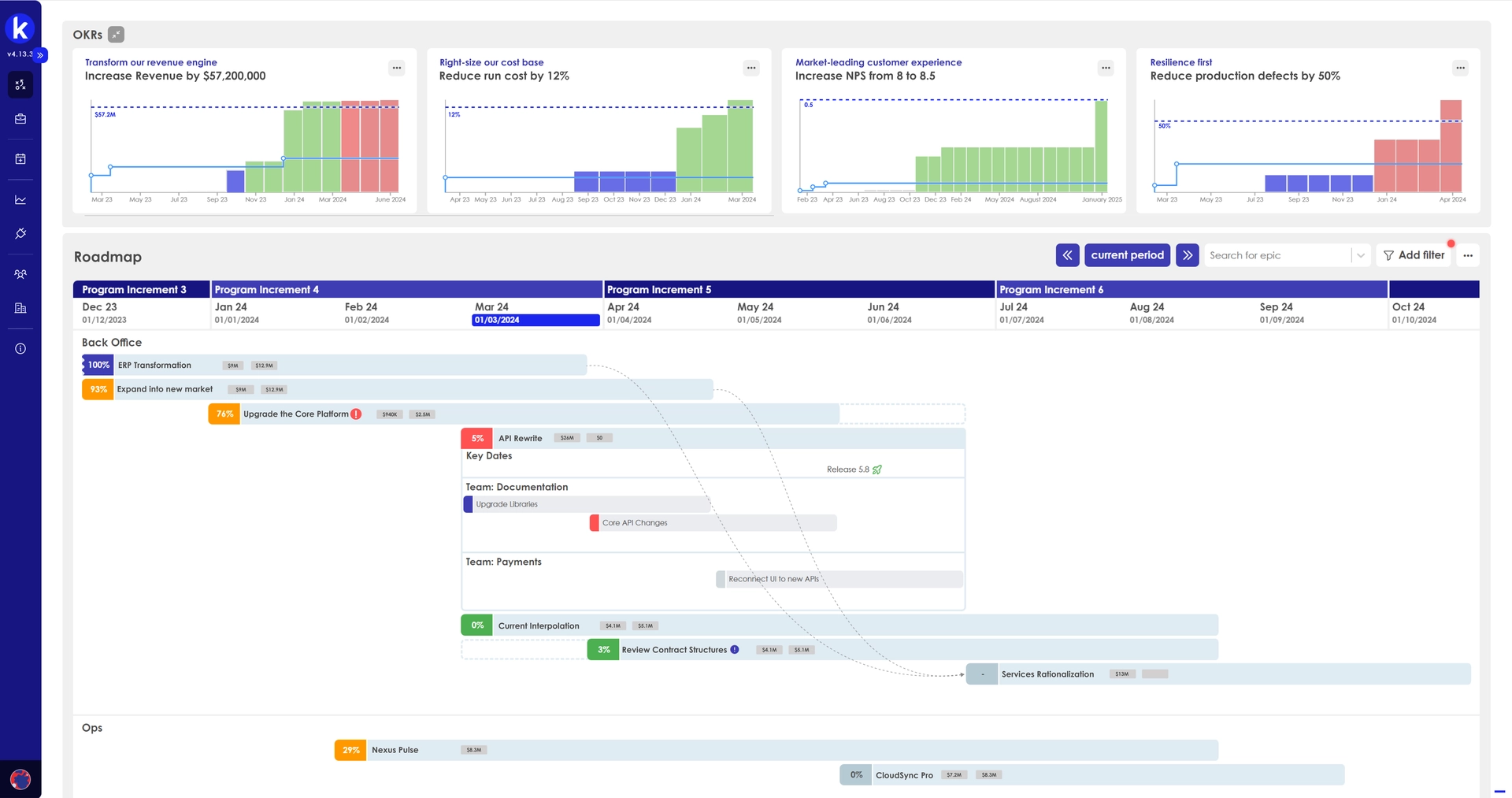
Project scheduling Task management, milestones, dependencies, baselines, and Gantt charts. Full project scheduling with Gantt, milestones, dependencies, and baselines — plus timeline views that roll up across the portfolio.
Governance & approvals Stage-gate workflows, project lifecycle management, and approval processes via SharePoint. Configurable governance workflows, stage gates, and approval chains with audit trails — no SharePoint dependency.
Custom forms & fields Enterprise custom fields and project detail pages for structured data capture. Fully customisable forms, fields, and views that can be configured per portfolio, programme, or project type.
Resource management Resource assignments, availability tracking, and role-based allocation at project level. Resource and role-based planning with cross-portfolio capacity visibility and team-level autonomy.
Portfolio views Portfolio dashboards assembled from project data and enterprise custom fields. Native portfolio views, roadmaps, and prioritisation built directly on portfolio-level data — no assembly required.
Budget tracking Project-level cost tracking with budget baselines and variance reporting. Project and portfolio-level budgets with cost tracking, forecasting, and baseline comparisons.
What Kiplot adds beyond Project Online    
Scenario modelling Not available. Portfolio what-if analysis required external tools or spreadsheets. Built-in scenario modelling to compare investment options, test funding trade-offs, and assess capacity impact before committing.
Advanced financials Single-currency project cost fields. Multi-currency, capitalisation, and ERP reconciliation handled externally. Multi-currency support, CapEx/OpEx classification, and direct ERP integration for real-time financial reconciliation.
Jira & Azure DevOps integration No native integration. Connecting agile delivery tools required third-party connectors or custom development. Out-of-the-box integration with Jira and Azure DevOps — delivery progress flows into portfolio views automatically.
Time tracking Basic timesheets available but rarely adopted. Most organisations used workarounds or external tools. Native time tracking with approval workflows, integrated into capacity planning and financial reporting.
Enterprise reporting OData feeds requiring Power BI or SSRS for meaningful reporting. Significant configuration effort. Out-of-the-box enterprise reporting with role-based dashboards for executives, finance, PMO, and delivery teams.
Agile & hybrid delivery Waterfall-oriented. Agile boards introduced in later versions but limited in enterprise portfolio context. Delivery-method agnostic. Teams choose waterfall, agile, or hybrid — all governed within the same portfolio framework.
Outcome tracking Benefits tracking not natively supported. Typically managed in spreadsheets post-delivery. Continuous outcome and benefits tracking connected to delivery, with visibility from initiative through to strategic objective.
Project scheduling

Project Online

Task management, milestones, dependencies, baselines, and Gantt charts.

Kiplot

Full project scheduling with Gantt, milestones, dependencies, and baselines — plus timeline views that roll up across the portfolio.

Governance & approvals

Project Online

Stage-gate workflows, project lifecycle management, and approval processes via SharePoint.

Kiplot

Configurable governance workflows, stage gates, and approval chains with audit trails — no SharePoint dependency.

Custom forms & fields

Project Online

Enterprise custom fields and project detail pages for structured data capture.

Kiplot

Fully customisable forms, fields, and views that can be configured per portfolio, programme, or project type.

Resource management

Project Online

Resource assignments, availability tracking, and role-based allocation at project level.

Kiplot

Resource and role-based planning with cross-portfolio capacity visibility and team-level autonomy.

Portfolio views

Project Online

Portfolio dashboards assembled from project data and enterprise custom fields.

Kiplot

Native portfolio views, roadmaps, and prioritisation built directly on portfolio-level data — no assembly required.

Budget tracking

Project Online

Project-level cost tracking with budget baselines and variance reporting.

Kiplot

Project and portfolio-level budgets with cost tracking, forecasting, and baseline comparisons.

Scenario modelling

Project Online

Not available. Portfolio what-if analysis required external tools or spreadsheets.

Kiplot

Built-in scenario modelling to compare investment options, test funding trade-offs, and assess capacity impact before committing.

Advanced financials

Project Online

Single-currency project cost fields. Multi-currency, capitalisation, and ERP reconciliation handled externally.

Kiplot

Multi-currency support, CapEx/OpEx classification, and direct ERP integration for real-time financial reconciliation.

Jira & Azure DevOps integration

Project Online

No native integration. Connecting agile delivery tools required third-party connectors or custom development.

Kiplot

Out-of-the-box integration with Jira and Azure DevOps — delivery progress flows into portfolio views automatically.

Time tracking

Project Online

Basic timesheets available but rarely adopted. Most organisations used workarounds or external tools.

Kiplot

Native time tracking with approval workflows, integrated into capacity planning and financial reporting.

Enterprise reporting

Project Online

OData feeds requiring Power BI or SSRS for meaningful reporting. Significant configuration effort.

Kiplot

Out-of-the-box enterprise reporting with role-based dashboards for executives, finance, PMO, and delivery teams.

Agile & hybrid delivery

Project Online

Waterfall-oriented. Agile boards introduced in later versions but limited in enterprise portfolio context.

Kiplot

Delivery-method agnostic. Teams choose waterfall, agile, or hybrid — all governed within the same portfolio framework.

Outcome tracking

Project Online

Benefits tracking not natively supported. Typically managed in spreadsheets post-delivery.

Kiplot

Continuous outcome and benefits tracking connected to delivery, with visibility from initiative through to strategic objective.

Evaluate Your Project Online Replacement

MICROSOFT PROJECT ONLINE ALERNATIVE

See How Kiplot Replaces Project Online

See how Kiplot replaces Project Online while elevating your delivery into a dedicated Strategic Portfolio Management (SPM) layer.

A Structured, Supported Transition from Project Online

No Disruption Required

Replacing Project Online does not require a disruptive change to how teams work.

Phased Migration Approach

Kiplot supports a phased migration approach that prioritizes continuity of reporting, governance, and portfolio visibility.

Staged Execution

Most organizations migrate in stages, maintaining delivery stability while reducing the operational effort required to maintain portfolio insight.

A Platform That Supports Enterprise Project Management and Beyond

Replacing Project Online requires more than replicating project schedules in a new tool. Organizations need a portfolio decision layer that connects initiatives, funding, and delivery without relying on project-centric workarounds.

Kiplot sits above execution tools and alongside financial systems, providing portfolio-level visibility, governance, and decision support while delivery continues in systems such as Jira and Azure DevOps.

1.

Portfolio decision layer replacing Project Online

Kiplot replaces Microsoft Project Online as the portfolio-level system for prioritization, funding decisions, and portfolio reporting. Decisions are made at the initiative and portfolio level rather than inferred from individual project plans.

2.

Works with existing delivery and financial systems

Delivery continues in tools such as Jira and Azure DevOps, while financial data remains in ERP systems. Kiplot connects these sources to replace the portfolio visibility previously assembled through Project Online, spreadsheets, and manual reconciliation.

3.

Enterprise portfolio governance without project-centric constraints

Portfolio governance, funding models, and reporting are managed independently of individual project structures. This avoids the configuration complexity and reporting workarounds required when Project Online is used beyond its original design.

Project Online Replacement FAQs

When is Microsoft Project Online retiring, and what does that mean for existing users?

+

Microsoft has announced that Project Online will retire in September 2026. After this date, the service will no longer be available.

Organizations using Project Online must either migrate to another Microsoft product, such as Planner Premium, or transition to an alternative platform that can support their existing portfolio, reporting, and governance requirements.

What are the realistic options for replacing Microsoft Project Online?

+

Organizations generally have two paths:

1. Migrate within the Microsoft ecosystem using Planner Premium and related tools, accepting reduced portfolio-level capability and increased reliance on Power BI and custom configuration.

2. Transition to a dedicated enterprise portfolio management platform that replaces Project Online as the portfolio system of record while allowing delivery to continue in existing tools.

The right option depends on whether Project Online was used primarily for task scheduling or as an input to broader portfolio governance.

How does Kiplot replace Microsoft Project Online in practice?

+

Kiplot replaces Project Online at the portfolio decision and governance layer, not at the task execution layer.

Project schedules can continue to live in tools such as Microsoft Project Desktop, Jira, or Azure DevOps. Kiplot connects to these sources to provide portfolio-level visibility across priorities, funding, capacity, and outcomes without requiring teams to change how they deliver work.

Do we need to migrate all project data out of Microsoft Project Online at once?

+

No. Most organizations adopt a phased transition.

Kiplot supports maintaining delivery stability while portfolio reporting, governance, and executive oversight move into a dedicated system of record. Project data can be migrated selectively, aligned to portfolio needs rather than requiring a full historical lift-and-shift.

Can we continue using Power BI and Microsoft reporting tools?

+

Yes. Many organizations continue to use Power BI for visualization and distribution.

The difference is that Power BI no longer acts as the portfolio system of record. Kiplot provides the underlying portfolio logic, calculations, and governance so reporting tools are used for presentation rather than manual consolidation and correction.

How long does a typical Project Online replacement take?

+

Timelines vary based on scale and complexity, but most organizations complete an initial transition within weeks rather than months.

Because Kiplot sits alongside existing delivery and ERP systems, organizations can establish portfolio visibility and governance without disrupting ongoing projects or rebuilding execution workflows.

What should organizations focus on first when replacing Project Online?

+

The most successful transitions start by clarifying what portfolio management needs to accomplish, rather than attempting to recreate existing Project Online structures.

This includes defining how investment decisions are made, how funding and capacity are governed, and how leadership consumes portfolio insight. Tools are then evaluated based on their ability to support those decisions with less operational effort.

Evaluate Your Project Online Replacement

MICROSOFT PROJECT ONLINE ALERNATIVE

See How Kiplot Replaces Project Online

See how Kiplot replaces Project Online while elevating your delivery into a dedicated Strategic Portfolio Management (SPM) layer.